

You have a folder with sixty invoices as PDFs, named things like scan_0042.pdf, and a spreadsheet to fill in with the date, supplier and amount of each one. In an ordinary chat you would open the files one by one, copy the text, paste it in, then copy the answer back into the sheet. Claude Cowork exists to remove that chore: you describe the result you want, and it opens the files, reads them, renames them and fills in the spreadsheet while showing you what it is doing.
It is the difference between an assistant that answers and one that finishes a job. Anthropic describes it as the agentic architecture of Claude Code brought to work that is not programming: documents, spreadsheets, presentations, folders to tidy up. You don't need a terminal or a single line of code.
This guide covers what Claude Cowork really is, what it costs, how it differs from Claude Code and how to use it safely. The information was checked against Anthropic's official pages in November 2026.
What you will learn:
- What Claude Cowork is, and which plans and devices it runs on
- How it works: connected folders, permissions and multi-step tasks
- The practical difference between Claude Cowork and Claude Code
- Three concrete examples for non-programmers, with ready-to-use prompts
- Limits, risks and what not to hand over to an agent
In brief
- Claude Cowork is Claude's agentic mode for office work: you describe an outcome and Claude plans and carries out the steps on its own.
- It requires a paid plan (Pro, Max, Ultra, Team or Enterprise). The free plan does not include it.
- It runs in the desktop app for macOS and Windows (Linux in beta), on the web and on mobile; local files require the desktop app.
- Claude Code is built for writing and managing software; Cowork is for documents, data and files, with no terminal.
- It only works in the folders you connect, and it asks your permission before permanently deleting a file.
What Claude Cowork is
Claude Cowork is the mode of Claude, Anthropic's assistant, that carries out multi-step tasks for you. Instead of answering a question, it receives a goal ("prepare a summary of October's expenses from these files"), breaks it down, uses the tools available and hands back finished work: a document, a spreadsheet, a presentation, a tidy folder.
The name makes sense given where it comes from. Anthropic first launched Claude Code, the agent for developers that reads a project, edits files and runs commands. Cowork takes its engine and opens it up to people who work with documents and data. The official guide says so plainly: unlike Claude Code, Cowork does not require a terminal.
One development is worth knowing about. Anthropic's product page now reads: "Claude Cowork is now just Claude". Chat and Cowork are merging into a single experience, with the change rolling out on the Pro, Max and Ultra plans first and the other plans to follow. The capabilities stay the same, but the line between "chat" and "Cowork" will be less and less visible in the interface. Anthropic's guide and the Team plan page still use the Cowork name, so you will see it everywhere.
If the idea of an agent is new to you, start with our no-code AI agents course: Cowork is a concrete, ready-to-use application of the concept.
How it works: folders, permissions and tasks
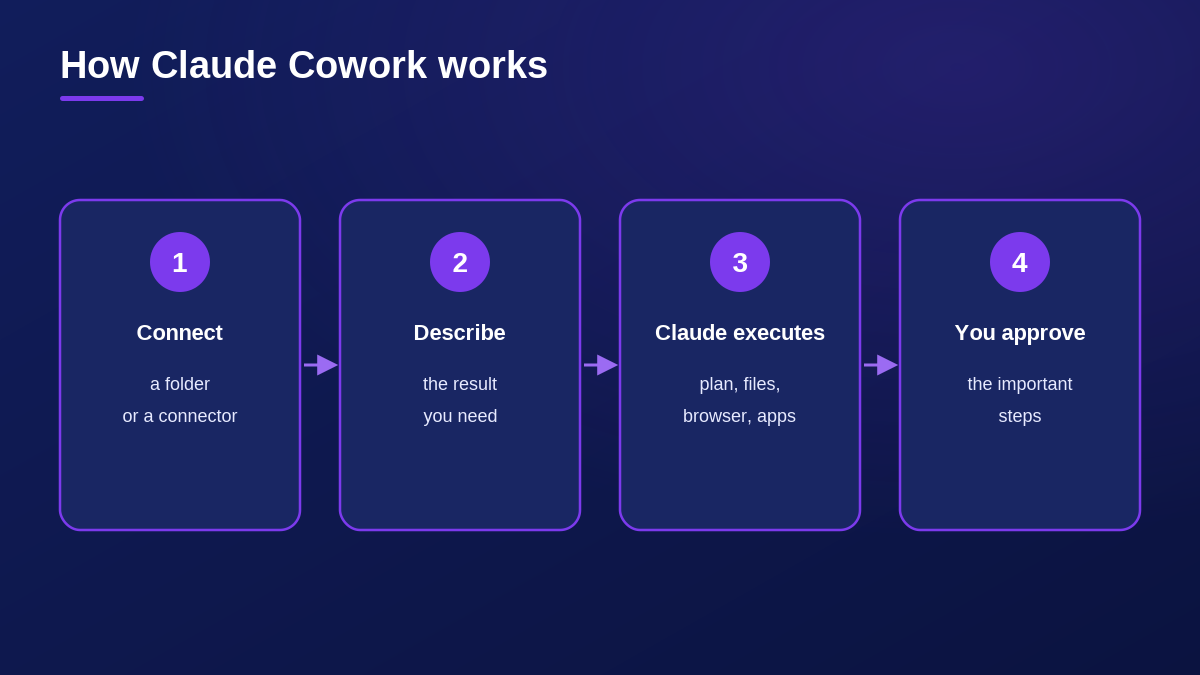
The typical flow has four steps. You connect a folder on your computer (or an app through a connector, such as Slack), describe the result, Claude shows you a plan and carries it out, and you review and approve the important steps. While it works you see the actions in progress, and cloud sessions keep going even if you close your laptop.
What it can do
According to Anthropic's official guide, Cowork can:
- read and write files in the folders you connect, in the desktop app;
- create documents, spreadsheets and presentations and edit existing drafts;
- use connectors and plugins, meaning links to other apps and ready-made skill packs;
- browse the web with a built-in browser or Claude in Chrome: open pages, read them, fill in forms;
- run scheduled tasks, on demand or at a fixed interval, with the
/schedulecommand; - split a large job across several sub-agents working in parallel.
What it asks before acting
Control stays with you, and it is the part to set up most carefully. Cowork works in an isolated environment and only sees the folders you have connected. To permanently delete a file it must ask for your explicit permission.
You can choose between three approval modes. In Manual mode you approve every action: it is the most cautious and the right choice at the start. In Auto, an automatic safety check reviews the actions, but Anthropic warns that it may miss a risk. With Skip there is no check at all, and it should only be used when you trust everything involved. For individual connectors you can set "Always ask", so Claude stops before every use.
Claude Cowork vs Claude Code: which one you need
It is the most common question, and the answer is simple: it depends on what you produce. The same engine does two different jobs. Anthropic sums it up this way: Claude Code is built for software engineering (writing, fixing and shipping code), Cowork for knowledge work that isn't code.
| Aspect | Claude Cowork | Claude Code |
|---|---|---|
| Who it's for | People who work with documents, data, email | Developers and people who manage software projects |
| Interface | Claude app (desktop, web, mobile) | Terminal, VS Code, JetBrains, desktop app, web |
| Typical tasks | Reports, spreadsheets, slides, folders to tidy | New features, bugs, tests, commits, pull requests |
| Skills required | Being able to describe a result | Programming and Git basics |
| Main risk | Unwanted changes to files and messages sent | Code changes and commands run on your system |
| Free plan | No | No |
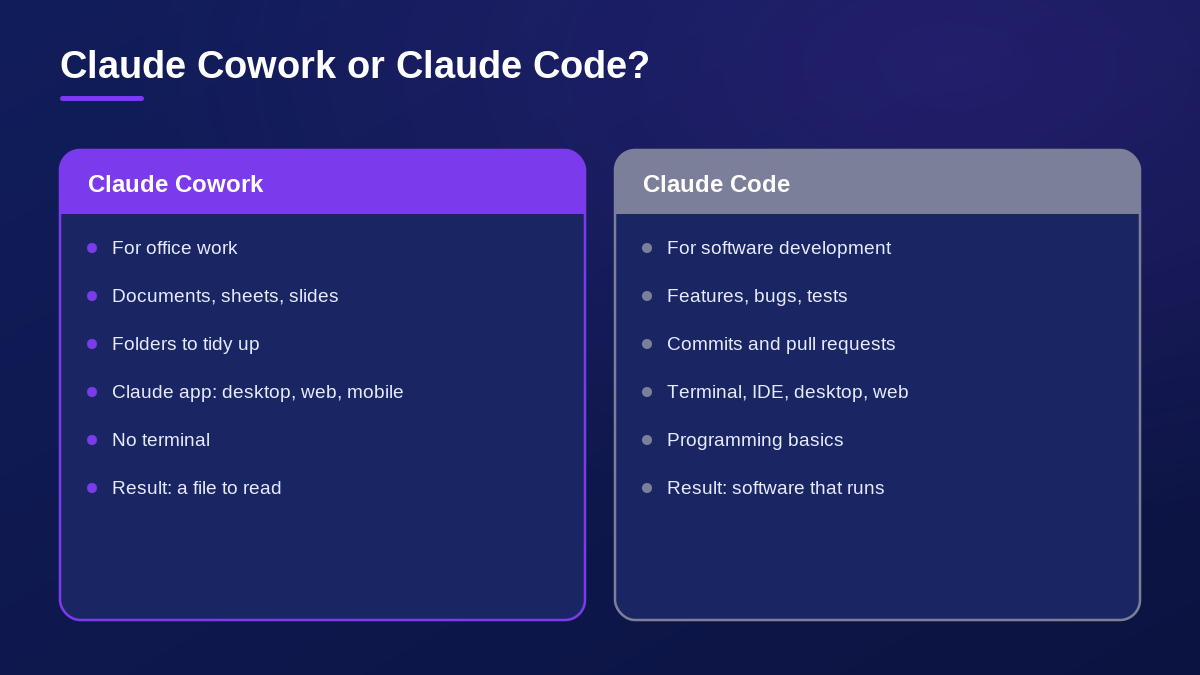
A practical rule of thumb: if the end result is a file to read (a report, a table, a presentation), start with Cowork. If the result is software that has to run, you need Claude Code. Many professionals use both, because plugins and connectors work in Cowork and in Claude Code alike.
What it costs and where it runs
Cowork has no separate price: it is included in the paid Claude plans. In November 2026 the Claude pricing page lists, in US dollars:
- Pro: $20 a month, or $17 a month billed annually;
- Max: $100 a month, with more usage than Pro;
- Ultra: $200 a month, for very heavy use;
- Team: from $25 per user per month ($20 billed annually), for groups of 2 to 150 people;
- Enterprise: on a company contract.
The final price in your currency, including any local taxes, is shown at checkout. Keep in mind a detail the product page states openly: agentic tasks use up your usage limits faster than chat does. If you use Cowork every day on long jobs, the Pro plan may not be enough.
On systems: the Claude desktop app is available for macOS and Windows, with a Linux beta. Cowork also works on the web and in the mobile app, but access to files on your computer, browser navigation and computer control require the desktop app to be open and connected. So yes, "Claude Cowork on Windows" exists: just download the latest Claude for Windows from claude.com/download.
Three practical examples for non-programmers
The examples below work with the desktop app and a connected folder. They start from real office tasks and leave the final check to you.
1. Tidy a folder of invoices. You connect the folder with the PDFs and ask for them to be renamed and summarised.
In the folder "Invoices 2026" there are PDF invoices with random names.
1. Read each file and rename it as YYYY-MM-DD_Supplier_Amount.pdf.
2. Create an Excel file "summary.xlsx" with date, supplier, invoice
   number, net amount, VAT and total.
3. If a value is unreadable, leave the cell empty and flag it
   in a sheet called "To check".
Do not delete any file. Show me the plan before renaming.
2. A report from several documents. You have three meeting minutes and a spreadsheet with the quarter's numbers: ask for a single summary.
Use the files in the folder "Q3": the three Word minutes and sales.xlsx.
Write a 2-page Word report for management with:
decisions made, open actions with an owner, three key numbers
for the quarter compared with the previous quarter.
For each statement, say which file it came from.
3. A first draft of a presentation. Start from a long document and ask for a slide outline, not the finished product.
From the document "client-proposal.docx" create an 8-slide
PowerPoint: title, problem, solution, timeline,
costs, next steps. Maximum 25 words per slide.
Put the details you cut into the speaker notes.
Notice that each prompt says what you want, in which format, and what to do when something doesn't add up. It is the same method you use in chat, applied to an agent: if you need a refresher, see our guide to writing clear instructions.
Limits and risks: what not to hand over
- Sensitive data. Connect only the folders the task needs, not the whole disk. Personal data about customers and employees is subject to your company's rules and to the GDPR; for AI governance in Europe, see our AI Act course.
- Output to verify. Cowork can misread a PDF or a number, like any model. Always check totals and figures: AI hallucinations don't disappear because the work arrives in a tidy file.
- Actions with consequences. Payments, emails sent in your name, important files: here Anthropic recommends staying close to the work or going back to manual mode.
- Backups. Before asking for bulk changes, make a copy of the folder.
Common mistakes to avoid
- Connecting your whole computer. The more folders you connect, the more can go wrong. One folder per project.
- Starting in automatic mode. For the first few weeks, approve every step: you learn how the agent reasons.
- Asking for the "how" instead of the "what". Describe the result and the constraints; Claude decides the sequence of steps.
- Not saying what to do when in doubt. A "if you're not sure, flag it" prevents invented data.
- Underestimating usage limits. Long jobs use a lot: group similar requests together.
Frequently asked questions
How does Claude Cowork work?
You connect a folder or an app, describe the result you want, and Claude plans and carries out the necessary steps: it reads files, creates new ones, and uses connectors and the browser. It shows you its actions as it works and asks for confirmation according to the approval mode you chose.
How much does Claude Cowork cost? Is it free?
It is not free: you need a paid Claude plan. In November 2026 prices start at the Pro plan ($20 a month, $17 billed annually), then Max, Ultra, Team and Enterprise. There is no separate charge for Cowork, but agentic tasks use up your limits faster than chat.
What is the difference between Claude and Claude Cowork?
Claude in chat replies to your messages; Cowork completes multi-step tasks by working on files, apps and web pages. Anthropic is merging the two experiences into a single app, so the distinction will become less and less visible in the interface.
Does Claude Cowork work on Windows?
Yes. You need the latest version of the Claude desktop app for Windows, available at claude.com/download. The app also exists for macOS and, in beta, for Linux. Cowork works on the web and on mobile too, but without access to local files.
What is the difference between Claude Cowork and Claude Code?
Claude Code is built for software development and is used from a terminal, a code editor, the desktop app or the web. Cowork is built for documents, data and office files and requires no technical skills. The agentic engine is the same.
The next step
Claude Cowork moves AI from the chat window to real work: files read, renamed, summarised and turned into reports, with you deciding goals, boundaries and approvals. It works well when the task is clear and checkable, and when you set up folders and permissions with care.
If you want to learn it properly, the EULE Institute course Claude Code and Cowork teaches you to configure it, instruct it, connect it to your tools and govern it safely, without programming. It is currently taught in Italian; the English page has the details and lets you request information. For a broader path on AI at work, see the complete artificial intelligence program.