

From chatbot to an agent that works for you
Every morning the same ten customer questions arrive: delivery times, returns, invoices, opening hours. The answers already exist, in an FAQ document, but someone has to read every email, find the right passage and write the reply. A chatbot would help you write a reply, if you asked it each time. An AI agent can instead read the email the moment it arrives, search your knowledge base, draft the reply and ask you only whether to approve it.
The good news is that building an AI agent without coding is now possible, with visual tools where you connect blocks instead of writing code. The bad news is that articles on the subject often skip the parts that decide whether the agent works: well-defined boundaries, human oversight, tests with real cases.
In this guide we build a complete example with n8n, described node by node, and compare the alternatives. The information on platforms and prices was checked against the official pages in November 2026.
What you will learn:
- What you really need before you start: goal, data, tools and limits
- No-code platforms compared, including the current state of custom GPTs and Gemini Gems
- Your first agent in n8n, in six steps
- How to add human approval and how to test the agent
- What it realistically costs, and which mistakes to avoid
In brief
- A useful agent starts from a small, well-defined task, not from an "assistant that does everything".
- You need four things: a clear goal, reliable data to consult, tools to use and written limits.
- With n8n you connect a trigger, a model, a knowledge base and tools, without writing code.
- Anything with effects on the outside world, such as sending an email, needs human approval.
- There are two costs: the platform and the model usage. The second grows with use.
Before you start: what you really need
If you want the conceptual picture (the perceive, reason, act loop, tool calling, memory), you will find it in any good introduction to what AI agents are. Here a working definition is enough: an agent is a system in which a language model decides which tools to use, one after another, to complete a task.
Before touching any platform, answer four questions in writing.
- Goal. What is the task, in one sentence? "Draft a reply to customer emails about deliveries" is a good goal. "Handle customer service" is not.
- Data. Where does it get its information? An FAQ document, a sheet with delivery times, an archive of procedures. If the document is out of date or contradictory, the agent will be too.
- Tools. What can it do: read the mailbox, consult a sheet, create a draft, send a message? Every extra action is an extra risk: start with the minimum.
- Limits. What must it never do: quote prices it doesn't know, decide refunds, answer on legal matters, handle sensitive data. Write them down now; they will become the agent's rules.
If you can't answer these four questions, you don't yet have a problem to solve with an agent: you need to clarify the process first.
The platforms for building an agent without code
The landscape changes fast, and in November 2026 it has changed notably for the best-known tools.
| Platform | Who it's for | Cost | Control |
|---|---|---|---|
| n8n | People who want to connect a model, data and tools in a visual workflow | Free when self-hosted (Community Edition); cloud from €20 a month, billed annually | High: you see every step, choose the model, add human approval |
| Microsoft Copilot Studio | Companies in a Microsoft environment | Depends on licence and usage, see Microsoft's documentation | High, with analytics and administration tools |
| Gemini skills | Personal use, reusable instructions with reference files | Available for personal Google accounts | Medium to low: they customise answers, they don't automate your systems on their own |
| ChatGPT plugins | Personal and team use in the OpenAI ecosystem | Depends on the ChatGPT plan | Medium: instructions, reference files and connected apps |
| Make | People who already automate processes between apps | Free plan with a limited number of monthly credits | Medium to high: visual scenarios with AI modules |
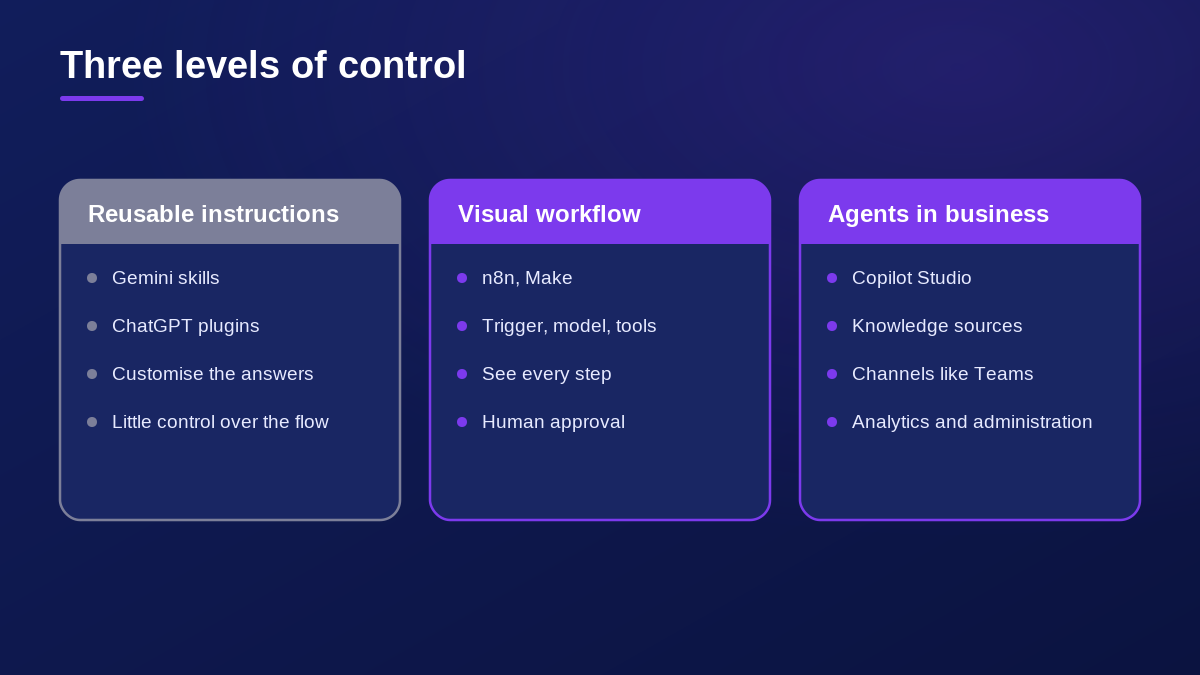
Two developments are worth knowing about, because many tutorials are now out of date.
Custom GPTs. According to OpenAI's help page, creating and publishing new GPTs is no longer available on personal accounts (Free, Go, Plus and Pro). Existing GPTs can still be used, and OpenAI points to plugins as the successor, with reusable instructions, reference files and connected apps. The same page says OpenAI plans to retire custom GPTs, with 11 December 2026 given as the standard retirement date. If you find a guide that says "build a custom GPT in ten minutes", check its date.
Gemini Gems. According to Google, Gems on personal accounts are being replaced by skills: reusable instructions you can call by typing "/" and the name, with reference files. On personal accounts, Gems became read-only skills on 17 November 2026 and are removed on 17 December 2026, so download any files you attached before then. For Workspace business, enterprise and nonprofit accounts the switch is planned for March 2027.
In both cases we are talking about custom assistants more than agents in the strict sense: they define how the model answers, but they don't build a workflow that reads your mail or updates a sheet on their own. For that you need platforms such as n8n, Copilot Studio or Make. If instead you want a ready-made agent that works on your files, look at Claude Cowork.
Step by step: your first agent with n8n
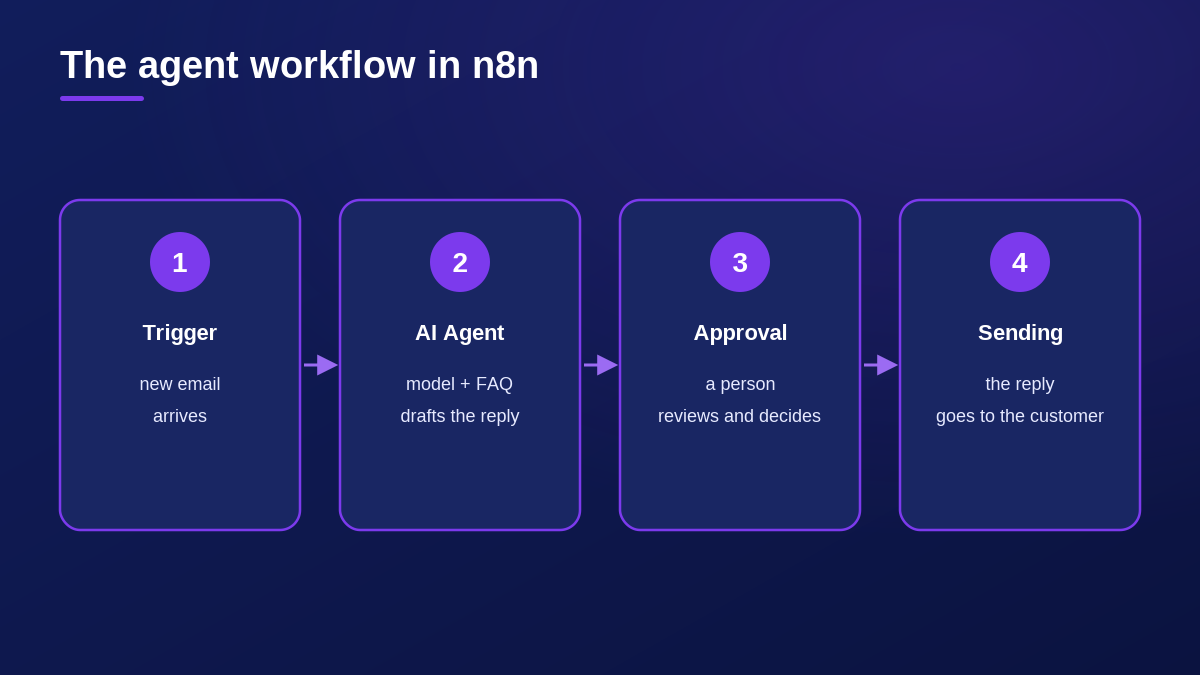
Let's build the promised example: an agent that drafts replies to customer emails using your FAQ. We do it in n8n because it lets you see every step and supports human approval. The diagram below summarises the flow.
1. Define the task and the boundaries
In the workflow, write down the goal and the limits you decided on earlier. For the example: the agent answers only questions about deliveries, returns and invoices; if the question is different, or it can't find the answer in the FAQ, it does not answer and flags the email to a person.
2. Connect the model
In n8n the central block is the AI Agent node. The official documentation explains that you connect a chat model and at least one tool to it: it is the agent that decides which tools to call. The flow starts from a trigger: for the example, a new email arriving in the support mailbox, using the Gmail or Outlook node. Then you choose the model (for example one from a provider you have an API key for) and write the system instructions, which are its mandate.
You are the assistant that drafts replies for the customer service team
of [Company name]. Reply in English, in a friendly and professional tone,
in at most 120 words.

What you can do:
- answer questions about deliveries, returns and invoices using ONLY
  the information found in the "FAQ" tool;
- if data is missing (order number, date), ask the customer for it.

What you must NOT do:
- do not invent times, prices or conditions you can't find in the FAQ;
- do not promise refunds or exceptions;
- if the question is outside deliveries, returns and invoices, or you
  can't find the answer, write exactly: ESCALATION and the reason.

Always sign "The [Company name] support team".
Writing effective instructions takes the same discipline as prompt engineering: role, task, context, format, and above all what not to do.
3. Add the knowledge base
The agent has to consult your information, not guess it. Connect a lookup tool: for a few FAQs, a Google Sheet with one column of questions and one of answers can be enough; for longer documents you use a vector store, the meaning-based search technique (RAG) covered in introductions to agents. Start with the sheet: it is simpler to keep up to date and to check.
Take care over the content: short answers, one per row, with a last-updated date. The quality of the agent depends on this page more than on the model.
4. Give it the tools
Add only what is needed. For the example: the tool that reads the FAQ and one that creates a draft reply in the mailbox. Don't add direct sending: the draft gives a person time to read. The more tools you add, the more can go wrong: every extra capability has to be justified.
5. Add human approval
This is the step that separates an experiment from something usable. n8n lets you require approval before the agent runs a tool: the workflow pauses, sends a review request showing the tool and the parameters the agent wants to use, and goes on only if someone approves. If the reviewer denies it, the action is cancelled and the agent is told it was rejected. The documentation lists n8n Chat, Slack, Discord, Telegram, Microsoft Teams, Gmail, Outlook, WhatsApp Business Cloud and Google Chat among the available channels. The review channel can also be different from the one the user talks in.
For the example, set the review on the tool that sends the email: the agent prepares, the person decides. Remember to write in the system instructions how to behave if the request is rejected. The reason for this check is the same as for hallucinations: the model can be confidently wrong, and an email that has been sent can't be recalled.
6. Test with 10 real cases
Before switching the agent on, collect ten real emails (anonymised, if they contain personal data) and run them through one by one. Pick a mix: three simple ones, three with missing data, two off-topic, two difficult or ambiguous. For each, check three things: did it use the right FAQ? Did it respect the limits? When it didn't know, did it say ESCALATION?
Fix the instructions, repeat, and only when all ten cases work move on to real use, with review always on. While you build, n8n lets you try the agent from the chat interface without making it public.
If you want to see the whole build, with guided labs, a company knowledge base and a final project followed by a mentor, there is the No-code AI Agents course. It is currently taught in Italian only; the page describes the programme.
How much an AI agent costs
There are two real costs, and the second is the one that surprises people.
The platform. In n8n the self-hosted Community Edition is free, but you have to provide a server and maintain it. The cloud has paid plans: in November 2026, according to n8n, Starter costs €20 a month and Pro €50 a month, billed annually, for 2,500 and 10,000 monthly executions respectively. A free cloud trial is available without a credit card. Every time the workflow runs it counts as an execution: with 100 emails a day you are already at about 3,000 executions a month.
The model. Model calls are paid by usage, based on the tokens used, and the price depends on the model you choose. A short email costs little, but an agent that consults several tools and rereads a lot of text uses more. Check the provider's price list and set a spending cap in its dashboard.
For a task of a few dozen emails a day the monthly cost generally stays modest. But it is worth measuring it with your ten tests before you promise a budget.
Common mistakes to avoid
- Too much autonomy. An agent that can send, delete and pay with no checks will get it wrong sooner or later. Start with the draft, not the send.
- No log. If you can't see what it did and why, you can't correct it. Check the executions the platform records and keep them for a reasonable period.
- Sensitive data with no rules. Before connecting email, customer records or confidential documents, clarify who handles them, where they end up and whether the model provider uses them for training. If you work in a company, involve whoever handles privacy and security.
- A neglected knowledge base. An agent with outdated FAQs confidently gives wrong information.
- Vague goals. "Help customers" is not a task: "draft the reply on deliveries and returns" is.
- Skipping tests. Ten real cases are worth more than a hundred "by feel" tries.
Frequently asked questions
How much does an AI agent cost?
It depends on the platform and the usage. With n8n you can start for free by self-hosting the Community Edition or trying the cloud, then plans start at €20 a month billed annually. On top of that comes model usage, paid per token. You measure the real cost with a trial on real cases.
What are the best free AI agents?
There is no absolute "best". To build your own agent, the options with free parts are n8n (self-hosted or on trial), Make (with a limited number of monthly credits) and Gemini skills for personal accounts. Free does not mean without cost: the model and your setup time count.
How do you create an agent with Gemini?
For personal Google accounts, Gemini now offers skills, which are replacing Gems: reusable instructions with reference files that you call with "/" in the chat. They are useful for a tailored assistant, but not for an agent that acts on its own across your systems: for that you need platforms such as n8n.
How do you create an agent in Copilot?
In a Microsoft environment you use Copilot Studio, a low-code studio where you can create an agent even by describing it in plain language, connect it to knowledge sources and publish it to channels such as Teams. Licensing and costs depend on your organisation's contract. To understand the versions of Copilot, read our guide to Microsoft Copilot.
Do you need to know how to code to build an AI agent?
No, for simple cases visual platforms are enough. You do need non-programming skills: describing a process, writing clear instructions, preparing reliable data and judging the results. For more complex systems or unusual integrations, a bit of logic and a developer's support help.
Next step
A good first agent is small, has a clear task, uses well-kept data and does nothing irreversible without a person approving. Build just one, test it on ten real cases and measure how much time it saves. Only then extend it.
If you want to do it with a guided path, with six labs in n8n, a company knowledge base and a final project followed by a mentor, the No-code AI Agents course takes you from the use case to a working agent. It is currently taught in Italian only; the course page describes what it covers. For a broader path, see the artificial intelligence program.